Shift4 Dine Kitchen Display System
Your Kitchen, Digitized
Replace paper tickets with commercial-grade screens: multi-station routing, prep timing, and real-time tracking.
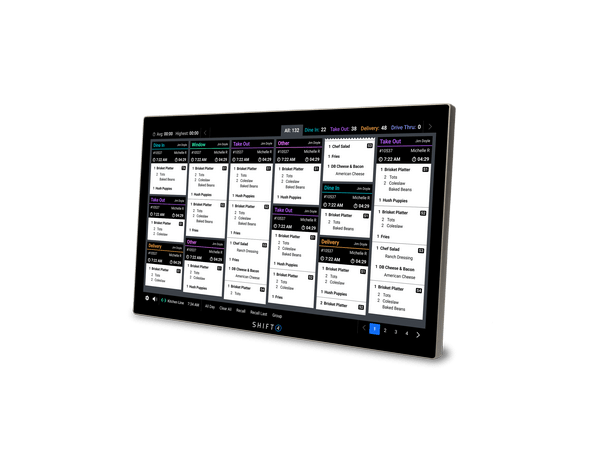
Live Ticket View
Color-coded timers turn green, yellow, and red so your team knows exactly what needs attention.
Classic Burger
+ Well Done, No Onion
Truffle Fries
Caesar Salad
Margherita Pizza
+ Extra Basil
Garlic Knots (6)
BBQ Ribs
+ Half Rack
Mac & Cheese
+ Add Bacon
Coleslaw
Cornbread (2)
Fish Tacos (3)
+ Spicy
Draft IPA
Station Routing
Orders split automatically to the right station. Each KDS shows only its assigned items.
Grill KDS
Burgers, Steaks, BBQ
Fry KDS
Fries, Wings, Tacos
Expo KDS
Final check before serve
Grill KDS
Burgers, Steaks, BBQ
Fry KDS
Fries, Wings, Tacos
Expo KDS
Final check before serve
Kitchen Workflow
From order in to plate out, every step tracked on screen.
Order In
POS, Mobile, Kiosk, or Delivery App
Assigned Station
Grill, Prep, Fryer, etc.
Prep Timer
Per-item countdown
Bump Complete
Station marks done
Expo Verify
Final check before serve
Serve
Guest notified
Order In
POS, Mobile, Kiosk, or Delivery App
Assigned Station
Grill, Prep, Fryer, etc.
Prep Timer
Per-item countdown
Bump Complete
Station marks done
Expo Verify
Final check before serve
Serve
Guest notified
Key Features
Real-Time Order Routing
- Receives orders from ALL sources: POS workstation, Shift4 Dine Mobile/Glass, Shift4 Dine Kiosk, AND third-party delivery apps (DoorDash, UberEats, etc.)
- Each KDS station shows ONLY its assigned items and modifiers
- Filter by order type: Dine In, Delivery, Pickup, Bar
- Color-coding by order type for instant visual identification
Multi-Stage Fulfillment
- Route tickets between stations: prep → assembly → expo
- Sending station completes ticket → notification sent to receiving station
- "Show Tickets When" option: Immediately (default) or after previous station completes
- Example: Grill station → Assembly → Expo verification
- Multi-Stage Fulfillment must be enabled on the RECEIVING KDS first
Prep Times
- Set per-item base prep times in Lighthouse Business Manager
- Set per-modifier additional prep times
- System compounds automatically: base item + modifier times = total
- Example: Burger (8 min) + Extra Crispy (+2 min) + Well Done (+3 min) = 13 minutes
Bump Station
- Broadcasts completion status of individual items on an order
- Example: salad station and fryer station broadcast to Expo that their items are done
- Recommended for prep stations specifically
- Enables cross-team collaboration
All Day View
- Shows all production items due at a station across all open orders in real-time
- Expo View: alphabetical menu item totals (no setup needed)
- Prep View: calculated preparable item totals (requires setup in Lighthouse)
- Pinned to left side of display, persists when paging through orders
- Counts refresh in real-time as items complete
All Day Summary
- Accessible from Completed screen: real-time breakdown of completed items for the day
- Check top-selling items, identify restocking needs, spot low-performers
- Toggle between Expo or Prep categories
- Based on local device data only (does not sync between devices)
Paper Tickets vs. KDS
See why kitchens are going digital.
Paper Tickets
Shift4 Dine KDS
Order visibility
Modifier clarity
Ticket timing
Station routing
Multi-stage fulfillment
Order source tracking
Real-time item counts
Heat & grease proof
Works when ink runs out
Zero recurring supply cost
Additional Features
KDS Hardware Specs
Bump Bar Specs
Best For
Pricing
$0
upfront for hardware
$29.99
/month per KDS station
Need kitchen printers as backup? Printers & Cash Drawers →
Where do orders originate? Shift4 Dine Workstation →
Self-service orders flow here too. Shift4 Dine Kiosk →
See the full hardware lineup. All Equipment →
Frequently Asked Questions
Ready to digitize your kitchen?
See the KDS in action with a free demo tailored to your kitchen workflow.